Best CRM for independent recruiters in 2026

Crelate leads our 2026 ranking of the best CRM for independent recruiters, with Loxo, Zoho Recruit, JobAdder, and Vincere ranked by use case.

Independent recruiters don't need the CRM built for a 200-seat staffing floor. They need one system that tracks candidates, clients, and pipeline stage without a dedicated admin running it.
TL;DR
- Crelate is the best CRM for independent recruiters in 2026 running a one-person desk.
- Loxo wins for sourcing-heavy solo recruiters who need built-in candidate search.
- Zoho Recruit is the best budget option for recruiters testing solo work before scaling.
- JobAdder fits recruiters planning to add a second biller within the next year.
- A CRM manages relationships you already have — it doesn't find new ones.
Why this matters
A solo recruiter juggles sourcing, client calls, and placements with no backup. The wrong CRM adds admin work instead of removing it — generic sales CRMs force you to bolt on candidate tracking, and enterprise recruiting platforms assume a team of ten.
The right CRM for an independent recruiter in 2026 does three things: tracks candidates and clients in one view, sets up in days not weeks, and scales if you hire a second biller. Everything else is noise.
Best overall for solo billers: Crelate. It runs candidate and client pipelines side by side without the setup overhead of a platform built for a 50-person floor. Best for sourcing-heavy independent recruiters: Loxo, which pairs CRM pipeline tracking with built-in AI sourcing. Best budget option: Zoho Recruit, the lowest-friction entry point for a recruiter still proving out the solo model. Best for recruiters planning to add a second biller: JobAdder, structured for multi-user growth from day one. Best for cross-border placements: Vincere, built to track candidates and clients across multiple markets in one pipeline.
What makes the best CRM for independent recruiters
- Built for recruiting, not adapted sales software — candidate and client pipelines in one place, not a deals board you have to reshape
- Fast solo setup — running inside days, not a multi-week implementation project
- One pipeline for both sides of the desk — candidates and client contacts tracked together, not in separate tools
- Room to grow — adding a second seat shouldn't mean switching platforms
- Honest reporting — visibility into pipeline health and time-to-fill without a BI consultant
- Mobile access — usable from a phone between client calls and interviews
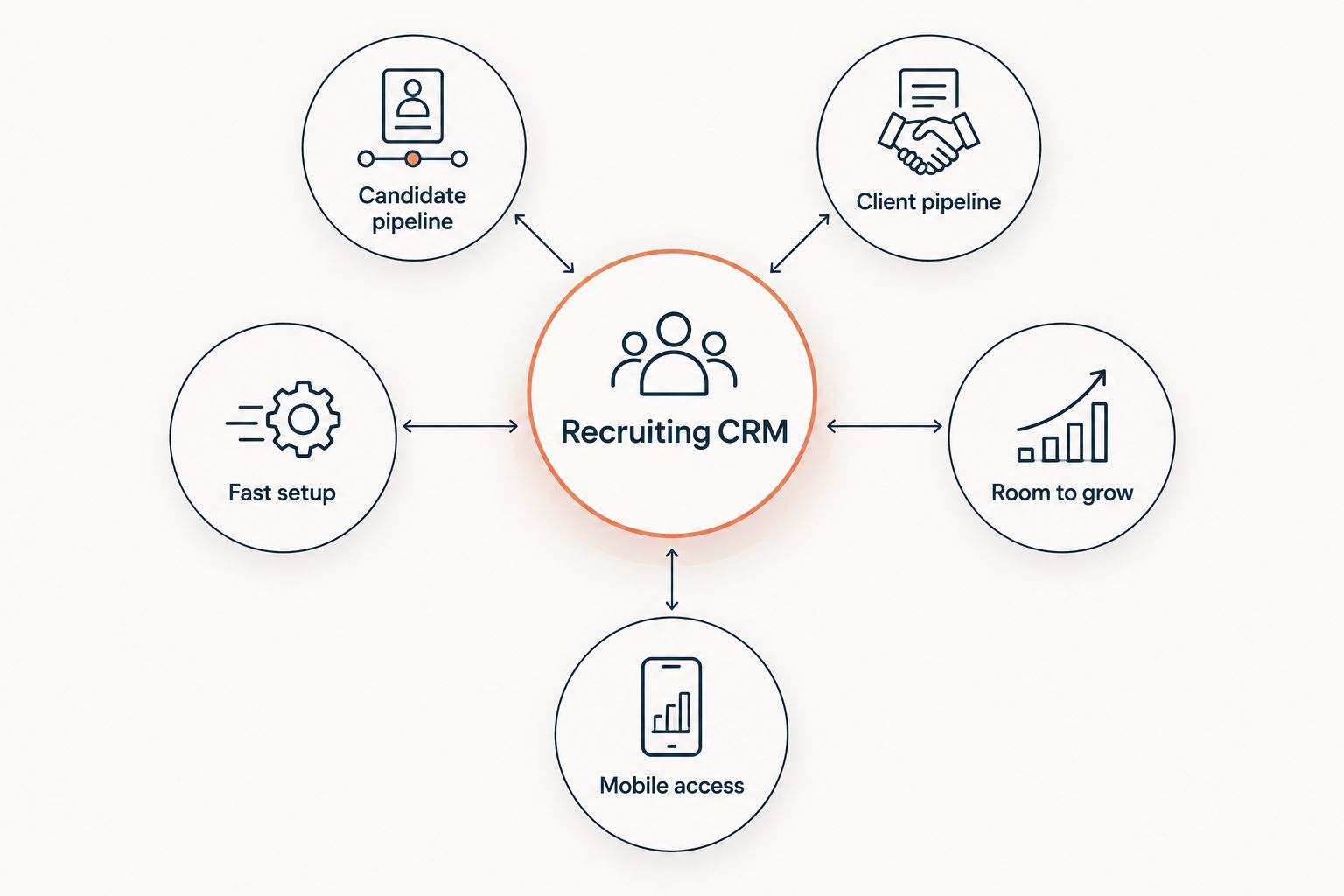
The strongest CRM for a solo desk handles both sides of the pipeline without a long setup.
At a glance
| CRM | Best for | Standout feature | Key limitation |
|---|---|---|---|
| Crelate | Solo billers wanting one system | Native recruiting pipelines, not adapted sales deals | Reporting is lighter than full enterprise platforms |
| Loxo | Sourcing-heavy independent recruiters | Built-in AI sourcing paired with CRM tracking | Learning curve for a solo user without a team to split setup |
| Zoho Recruit | Budget-conscious recruiters starting out | Lower cost of entry inside the wider Zoho suite | Fewer staffing-specific workflows out of the box |
| JobAdder | Recruiters planning to add a second biller | Multi-user structure ready from day one | More than a true one-person desk usually needs |
| Vincere | Cross-border or multi-market placements | Tracks multiple markets inside one pipeline | Steeper setup for a single-country solo desk |
1. Crelate: best CRM for a one-person desk
Crelate was built for recruiting workflows from the ground up, which shows up in how it handles candidate sourcing, client contacts, and job orders inside the same view. A solo recruiter can set up a pipeline in a sitting and start logging activity the same day.
Crelate pros:
- Candidate and client pipelines live in one system, not two
- Setup is fast enough for a solo recruiter to run without IT help
- Workflow stages map to how a recruiting desk actually moves, not a generic sales funnel
Crelate cons:
- Reporting depth falls short of enterprise platforms like Bullhorn
- No built-in tracking of hiring or funding signals for new client opportunities
- Add-ons for deeper automation add complexity as you scale
Crelate pricing: plans vary by seat count and feature tier — check current pricing directly with Crelate.
Best for: a solo recruiter who wants one system for the whole desk. Verdict: Buy.
2. Loxo: best CRM for sourcing-heavy independent recruiters
Loxo combines CRM pipeline tracking with AI-assisted candidate sourcing, which matters most for recruiters who spend more hours hunting talent than managing client relationships. The sourcing layer sits inside the same system as the pipeline, so you're not toggling between tools.
Loxo pros:
- Sourcing and pipeline tracking in one platform
- Useful for recruiters who fill niche or hard-to-source roles solo
- Scales past a solo desk without a platform switch
Loxo cons:
- More feature surface than a true solo recruiter needs on day one
- Steeper learning curve without a teammate to split the setup work
- Still a candidate-and-client management tool — it doesn't monitor outside signals for new client leads
Loxo pricing: varies by plan tier — confirm current terms on Loxo's site.
Best for: sourcing-heavy independent recruiters. Verdict: Buy.
3. Zoho Recruit: best budget option for recruiters starting solo
Zoho Recruit sits inside the broader Zoho suite, which keeps the entry cost lower than dedicated recruiting-only platforms. It covers the basics — candidate tracking, client records, job postings — without the staffing-specific depth of Crelate or Loxo.
Zoho Recruit pros:
- Lower cost of entry than dedicated recruiting CRMs
- Familiar interface if you already use other Zoho tools
- Enough structure to replace a spreadsheet-based system
Zoho Recruit cons:
- Fewer staffing-specific workflows out of the box compared to Crelate or Loxo
- Customization for a recruiting-specific pipeline takes more manual setup
- Limited sourcing features without add-ons
Zoho Recruit pricing: tiered by user and module — check the current plan structure on Zoho's site.
Best for: recruiters testing the solo model before committing to a heavier platform. Verdict: Buy for the budget-conscious; Wait if you need staffing-specific depth now.
4. JobAdder: best CRM for recruiters planning to add a second biller
JobAdder is structured for multi-user growth from the start, which makes it a stronger pick for an independent recruiter who expects to bring on a second biller or a resourcer within the next year rather than stay solo indefinitely.
JobAdder pros:
- Multi-user permissions and structure ready without a platform migration later
- Clean interface that doesn't require heavy training to onboard a new hire
- Solid candidate and client pipeline tracking
JobAdder cons:
- More structure than a permanent one-person desk needs
- Setup takes longer than lighter solo-focused tools
- No native tracking of hiring or funding signals for prospecting new clients
JobAdder pricing: varies by seat and plan — confirm current pricing with JobAdder.
Best for: independent recruiters planning to scale into a two-person desk. Verdict: Hold if staying solo; Buy if scaling within 12 months.
5. Vincere: best CRM for cross-border placements
Vincere is built to handle recruiting operations across multiple markets inside one pipeline, which matters if your independent desk places candidates across country lines rather than within a single local market.
Vincere pros:
- Tracks candidates and clients across multiple markets in one system
- Deeper operational structure than most solo-focused tools
- Useful if your desk already works beyond one country
Vincere cons:
- Overbuilt for a single-market solo desk
- Setup and onboarding take longer than lighter platforms
- Steeper cost of entry relative to single-market tools
Vincere pricing: confirm current terms directly with Vincere — plans vary by market and seat count.
Best for: independent recruiters placing across borders. Verdict: Buy for cross-border desks; Skip for a single-market solo operation.
How we ranked
Each platform was weighed against the six criteria above: built-for-recruiting pipelines, solo setup speed, combined candidate-and-client tracking, room to add a seat, reporting clarity, and mobile access. No platform here wins on all six — the ranking matches each tool to the use case it fits best, not a single universal winner.
What a CRM can't do for you
A CRM organizes relationships you already have. It logs the candidate you placed last month and the client who hired through you in 2024. What it doesn't do is tell you which companies are hiring right now, which ones just raised funding, or which decision-maker at a past client just moved to a new company.
That gap is why some independent recruiters pair a CRM with a separate layer that watches outside signals. Is HubSpot enough for a staffing agency, or do you need a CRM walks through where a generic sales tool stops being enough for staffing work — the same gap applies to CRMs built for recruiting, just further along.
StaffingLeads isn't a CRM and doesn't replace one — it tracks hiring, funding, and past-client signals, then identifies the decision-maker with a verified email so you can run outreach before a competitor does. Run it alongside whichever CRM from this list fits your desk; it fills the sourcing-new-clients gap a CRM was never built to cover.
See what a CRM can't show you
Track hiring and funding signals your CRM never catches.
Which CRM should you choose?
If you're running a true one-person desk in 2026 with no plans to hire, Crelate is the default pick — it covers both sides of the pipeline without the setup weight of a bigger platform. If sourcing eats most of your week, move to Loxo. If you're still proving out solo recruiting and want the lowest cost of entry, start with Zoho Recruit and migrate later if you outgrow it. Don't pick based on brand name alone — pick based on whether you're staying a one-person desk or building toward a second seat.
FAQ
What's the best CRM for independent recruiters in 2026?
Crelate is the best overall pick for a true one-person desk because it tracks candidates and clients in one pipeline without heavy setup. Loxo fits better if sourcing takes up most of your week, and Zoho Recruit works as a lower-cost starting point.
Is Bullhorn too much for a solo recruiter?
Bullhorn is built for multi-seat staffing floors and typically carries more setup and administration than a one-person desk needs. Lighter platforms like Crelate or Zoho Recruit are usually a better starting fit for independent recruiters.
Does a recruiting CRM help me find new clients?
No. A CRM organizes candidates and clients you've already engaged with — it doesn't monitor hiring, funding, or network signals that flag new client opportunities. That's a separate layer on top of the CRM.
Can I just use HubSpot instead of a dedicated recruiting CRM?
HubSpot can track contacts and deals, but it isn't built around candidate pipelines, placements, or the dual-sided nature of staffing work. Most independent recruiters outgrow a generic sales CRM once volume increases.
What's the difference between an ATS and a CRM for a staffing desk?
An ATS tracks candidates through a hiring process for a specific job order. A CRM tracks the broader relationship with both candidates and client contacts over time, including past placements and future opportunities.
Should a solo recruiter pick a platform built for multi-user teams?
Only if you expect to add a second biller or resourcer within the next year. Platforms like JobAdder are structured for that growth, but they add setup overhead a permanent one-person desk doesn't need.
Is Loxo worth it for an independent recruiter?
Loxo is worth it if sourcing candidates takes up more of your time than managing client relationships, since it combines AI-assisted sourcing with CRM pipeline tracking in one system.
Does switching CRMs later cause data loss?
Migrating candidate and client records between platforms carries risk if not planned, so most recruiters start with a platform that has room to scale rather than switching twice. Confirm export and import options directly with each vendor before committing.
One last thing
Most independent recruiters pick a CRM first and figure out new-business sourcing later — it works better in reverse. A CRM holds the relationships you've already built; the harder problem in 2026 is knowing which company just started hiring, who just got funded, or which decision-maker at a past client moved to a new role before you send an email. Solve that problem with a signal-tracking layer, then let the CRM do what it's built for: keeping the pipeline organized once the conversation starts.
Related guides
Let your agent start the conversations.
StaffingLeads watches hiring, funding, past-client and network signals, finds the decision-maker behind each one, and sends personalised email and LinkedIn outreach in your voice. You pick up the replies.
Start your 14-day free trial →Keep reading
Free, no signup