Best recruitment CRM software for staffing agencies in 2026

The best CRM for staffing agencies depends on your workflow. Compare Bullhorn, Recruit CRM, and HubSpot, then test client ownership, job handoffs, and reporting.

The best CRM for staffing agencies is the one that fits your client-to-job workflow: shortlist Bullhorn or Recruit CRM when you need recruiting and relationship management together; consider HubSpot when client sales is separate from candidate delivery. This 2026 guide compares those choices and explains where StaffingLeads fits as a business-development tool—not a CRM replacement.
TL;DR
- The best CRM for staffing agencies depends on client ownership, recruiting handoffs, and reporting—not feature count.
- Compare Bullhorn and Recruit CRM when you want applicant tracking and client relationships in the same system.
- Consider HubSpot when your sales pipeline is separate from candidate delivery.
- StaffingLeads supports staffing business development through hiring signals and outreach; it is not an ATS or CRM.
Why this matters
A staffing agency manages two connected relationships: the employer buying recruitment services and the candidate being represented. Your CRM choice needs to reflect how those relationships become job orders and placements.
A solo biller needs a clear next action. A full-desk recruiter needs client context alongside recruiting activity. A dedicated business-development team needs to hand an opportunity to delivery without losing the brief, contact history, or account owner.
For your 2026 shortlist, start with that handoff. A tidy sales pipeline is not enough if recruiters must reconstruct the client conversation after every meeting. Read the recruiting software guide for staffing firms if you need to separate your ATS, CRM, and prospecting requirements before choosing.
What makes a CRM suitable for staffing agencies?
Use these criteria before requesting demonstrations. Ask vendors to show the workflow rather than answer with a feature checklist.
- Account ownership: Can your team see who owns the company, each contact, and the next action?
- Relationship history: Can a recruiter understand past conversations without searching separate inboxes?
- Job handoff: Can an agreed requirement move into recruiting without retyping the brief?
- Reporting: Can you distinguish outreach activity, qualified opportunities, job orders, and placements?
- Data control: Can you manage duplicates, permissions, exports, and departures from the team?
- Working habits: Does the system match how your recruiters actually record calls and update accounts?
Choose the system your team can keep accurate during a busy recruiting day. An elaborate setup that nobody maintains gives you unreliable records, not better business development.
Recruitment CRM options at a glance
These are conditional choices, not a universal ranking. Bullhorn and Recruit CRM combine recruiting functions with relationship management; HubSpot is a broader sales CRM. Confirm the exact capabilities included in each proposed configuration.
| Option | Best for | Main strength | Main limitation | Deciding demonstration |
|---|---|---|---|---|
| Bullhorn | Agencies evaluating a staffing-focused ATS and CRM together | Recruiting and client management in a staffing-oriented system | A combined system is a poor fit if you only need a separate sales pipeline | Move a client requirement through recruiting while preserving account context |
| Recruit CRM | Recruiting teams evaluating a combined ATS and CRM workflow | Candidate and client management in one recruiting product | Product category alone does not prove your reporting or permission requirements fit | Show a full-desk recruiter switching between client development and candidate delivery |
| HubSpot | Agencies keeping client sales separate from recruiting delivery | A sales CRM organized around contacts, companies, and deals | It is not a staffing ATS; recruiting delivery needs a separate workflow | Hand a won opportunity to delivery without losing the client brief |
A combined ATS and CRM is not automatically better. It reduces the need to separate recruiting and client records, but you still need clear ownership and disciplined updates. A separate sales CRM creates a distinct business-development workspace, but the delivery handoff becomes your responsibility.
Bullhorn: evaluate the connected staffing workflow
Best for: agencies that want to evaluate client management and recruiting delivery together. Bullhorn belongs on the shortlist when your CRM decision is also an ATS decision.
Start with a real account. Ask the vendor to show the employer, its contacts, the current requirement, and the recruiting work associated with that requirement. Then ask a recruiter to find the last meaningful client conversation.
Bullhorn strengths:
- Its ATS and CRM positioning matches a staffing agency's combined recruiting and relationship-management needs.
- A staffing-focused system is a relevant starting point when your buying brief includes both candidates and clients.
- Evaluating the two functions together lets you inspect the handoff within one proposed system.
Bullhorn limitations:
- Buying a combined system is unnecessary if your only problem is managing sales opportunities separately.
- A product demonstration does not establish whether your existing records, permissions, and reports will transfer cleanly.
Stay with Bullhorn if your team trusts the records, delivery receives usable briefs, and management can follow opportunities through to recruiting outcomes. Switching CRM will not fix inconsistent account ownership.
Verdict: shortlist Bullhorn for a combined staffing workflow; keep it when the current workflow already works.
Recruit CRM: evaluate the full-desk working day
Best for: recruiting teams comparing an ATS and CRM through the full-desk recruiter's workflow. Recruit CRM combines applicant tracking and client relationship management, making it a relevant comparison with Bullhorn.
Do not make ease of use a slogan. Ask a recruiter to complete ordinary tasks in the proposed system: find a client contact, record a conversation, identify the next action, and move to the associated recruiting work. Watch where context disappears.
Recruit CRM strengths:
- Its combined ATS and CRM scope addresses both candidate management and client relationships.
- Recruiting-specific positioning makes it relevant to teams that do not want a sales-only CRM.
- You can evaluate client development and delivery against the same operating brief.
Recruit CRM limitations:
- A combined product still needs your team to define ownership, stages, and required information.
- Do not assume your permission model, specialist reports, or external workflows fit without a demonstration.
Stay with your current recruiting CRM if switching would reproduce the same process problems in a different interface. First establish whether the issue is missing functionality or missing discipline.
Verdict: shortlist Recruit CRM when a combined recruiting workflow is the requirement, then let recruiter-led tasks decide.
HubSpot: evaluate the sales-to-delivery boundary
Best for: agencies with a distinct client-sales process and a separate recruiting system. HubSpot is a sales CRM, not a staffing ATS. That distinction is the reason to consider it—and the reason to reject it when candidate delivery must live inside the same product.
Build the demonstration around an employer opportunity. Track the contact, company, next action, and deal stage. Then show exactly how delivery receives the agreed role, hiring context, and client commitments.
HubSpot strengths:
- Its contact, company, and deal structure fits a client-sales pipeline.
- A separate sales workspace suits an operating model with a defined business-development function.
- Keeping sales and delivery distinct makes their ownership boundaries explicit.
HubSpot limitations:
- HubSpot does not replace a staffing ATS.
- Separating systems creates a handoff that needs defined ownership and a reliable process.
Stay with HubSpot if your sales team uses it consistently and recruiters receive complete briefs through your established delivery workflow. Do not replace a functioning sales CRM simply because a recruiting product combines more categories.
Verdict: choose HubSpot for a separate sales process, not as a substitute for applicant tracking.
Where StaffingLeads belongs—and where it does not
StaffingLeads is a staffing business-development tool for agencies that need signal-based targeting and email and LinkedIn outreach. It watches hiring, funding, past-client, and network signals, identifies decision-makers with verified email, and runs outreach sequences.
That addresses a different problem from maintaining your client records. A CRM organizes the relationships your team manages. Signal-based prospecting helps identify whom to approach and why the timing is relevant.
StaffingLeads strengths: staffing-specific targeting, attention to hiring and relationship signals, and decision-maker outreach across email and LinkedIn.
StaffingLeads limitations: it is not an ATS or CRM. It has no integrations with Bullhorn, Salesforce, or HubSpot; do not design your workflow around an assumed connection.
Best for: agencies whose client records are serviceable but whose business-development process needs better targeting and outreach. Keep CRM selection and prospecting selection as separate decisions.
Run a workflow test before choosing in 2026
Use the same sample records and tasks for every vendor. For this buying exercise, prepare 10 account records and 3 job briefs, then allocate 30 minutes per demonstration to your own tasks. These are suggested test inputs, not vendor performance benchmarks.
Define ownership
Include an active client, a past client, and a prospect. Identify the account owner, contact owner, and person responsible for the next action. Ask what happens when ownership changes.
Record context
Enter a client conversation containing a hiring need and a follow-up commitment. Have another recruiter find it without guidance. The test is whether the context is usable, not whether a notes field exists.
Hand off work
Move an agreed requirement from business development to recruiting. Check whether delivery receives the role brief, client expectations, contact details, and next step. Record every piece of information that needs manual re-entry.
Review outcomes
Ask management to distinguish activity from progress. A call is an activity; a qualified opportunity has an agreed business reason to continue. Define the difference before accepting a dashboard.
Export records
Request an export of the sample records and inspect it. Check what happens to ownership, notes, and relationships between records. Make data access part of the buying decision, not an afterthought.
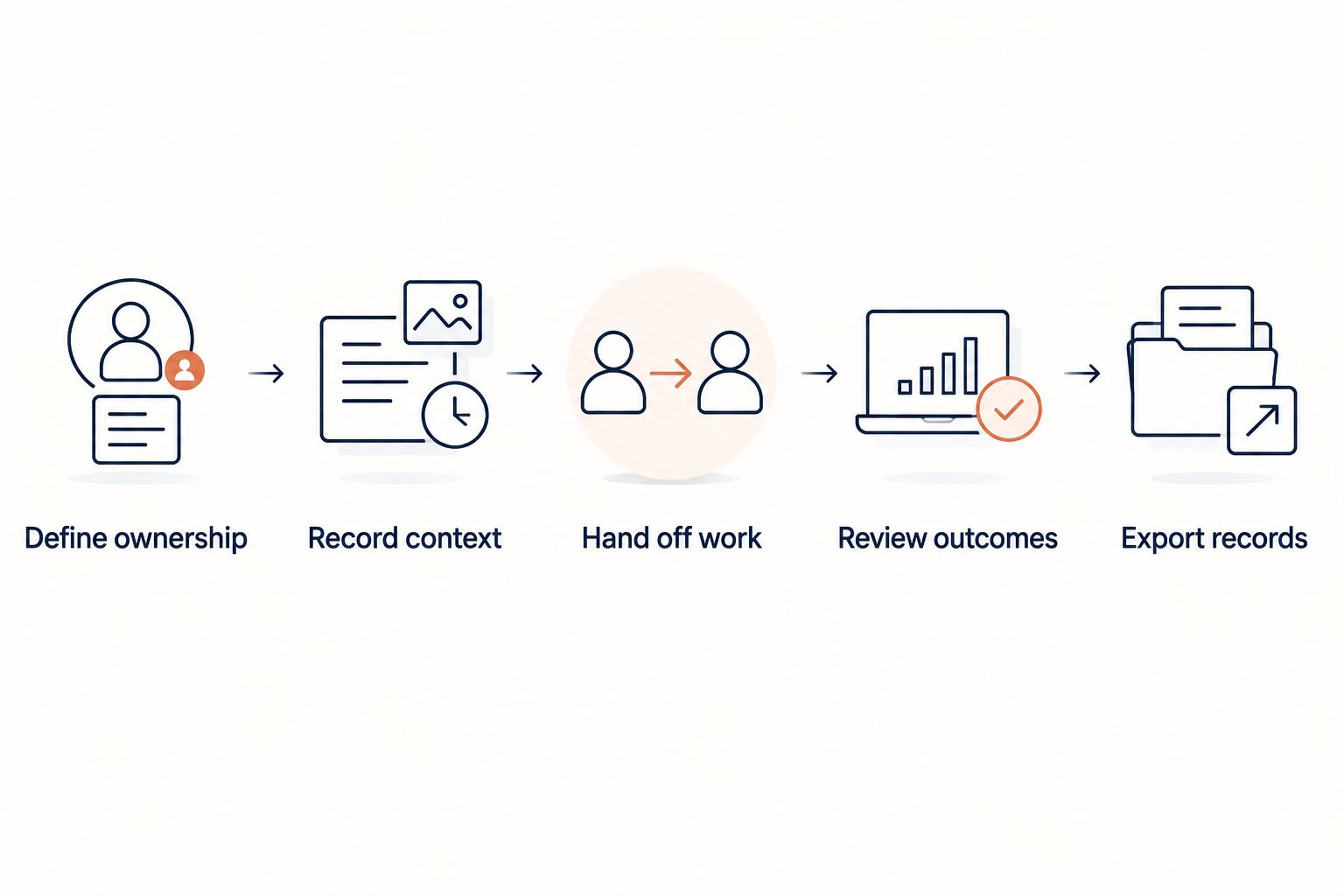
Test the same client-to-job workflow in every CRM demonstration.
Which CRM should you choose?
For a 2026 decision, choose the operating model first. Compare Bullhorn and Recruit CRM when you need recruiting and client management together. Choose HubSpot when sales is deliberately separate from candidate delivery.
Keep your current CRM when it supports the workflow and your team maintains reliable records. Fix account ownership, stage definitions, and handoffs before paying for a migration. A switch is justified by a demonstrated workflow gap—not a longer feature list.
FAQ
What's the best CRM for staffing agencies in 2026?
The best CRM for staffing agencies is the one that matches their client-to-job workflow. Compare Bullhorn and Recruit CRM for combined ATS and CRM needs; consider HubSpot for a separate client-sales process.
Does a staffing agency need both an ATS and a CRM?
A staffing agency needs both candidate-management and client-relationship functions. Those functions can sit in a combined system or in separate systems with a defined handoff.
Is Bullhorn better than Recruit CRM?
Choose between Bullhorn and Recruit CRM by testing your own recruiting and client-management tasks. Demonstrate ownership, conversation history, job handoffs, reporting, and exports using the same sample records.
Is HubSpot enough for a staffing agency?
HubSpot can serve the client-sales side of a staffing agency, but it does not replace a staffing ATS. Choose it when recruiting delivery has a separate, defined workflow.
Is StaffingLeads a recruitment CRM?
StaffingLeads is a staffing business-development tool, not a recruitment CRM or ATS. It tracks hiring, funding, past-client, and network signals, identifies decision-makers with verified email, and runs email and LinkedIn outreach.
When should a staffing agency replace its CRM?
Replace a CRM when a demonstrated workflow gap prevents your team from managing relationships or handing work to delivery. Correct unclear ownership and inconsistent recordkeeping before deciding that software is the problem.
What should a solo recruiter test before choosing a CRM?
A solo recruiter should test whether the CRM makes client context and the next action easy to find. Also test the transition from a client conversation to recruiting work and the ability to export records.
One last thing
Before signing a 2026 CRM agreement, ask a recruiter who missed the sales call to find the client brief and explain the next action. If the answer requires searching personal inboxes, the handoff still needs work. Repeat that test after configuration—not just during the vendor's prepared demonstration.
Related guides
Let your agent start the conversations.
StaffingLeads watches hiring, funding, past-client and network signals, finds the decision-maker behind each one, and sends personalised email and LinkedIn outreach in your voice. You pick up the replies.
Start your 14-day free trial →Keep reading
Free, no signup