Best applicant tracking systems for staffing agencies in 2026

Best ATS for staffing agencies: choose by delivery model, not feature count. Compare workflows, test candidate handoffs, and know when to keep your system.

The best ATS for staffing agencies in 2026 depends on who owns delivery and sales: choose a combined ATS and CRM for a full-desk workflow, a candidate-focused ATS when sales operates separately, or keep your current system when candidate delivery already works. This guide explains how to make that decision without confusing applicant tracking with client acquisition.
TL;DR
- The best ATS for staffing agencies fits candidate delivery, client ownership, and recruiter handoffs.
- Full-desk recruiters should evaluate candidate and client workflows together, not as disconnected feature lists.
- Keep your existing ATS when delivery works and the real problem is insufficient client conversations.
- StaffingLeads supports staffing business development; it is not an ATS or CRM.
Why this matters
An ATS decision affects how recruiters find candidates, submit them, record feedback, and move assignments toward placement. A business-development decision affects which employers you approach and why they should talk to you. Those are different jobs.
Start by separating them. The broader recruiting software for staffing firms decision becomes clearer when each system has a defined responsibility. Buying another candidate database does not solve an empty client pipeline.
For your 2026 shortlist, name the broken workflow before naming the replacement. Missing candidate history calls for a different fix than missed hiring signals or outreach to the wrong decision-maker.
What makes an ATS right for a staffing agency?
Judge the system against work your recruiters actually perform. Use these criteria before you accept a feature presentation:
- Candidate retrieval: Can a recruiter find a relevant candidate using the fields your niche requires?
- Submission history: Can the team see which candidate went to which client, for which role, and what happened next?
- Client ownership: Can recruiters identify the account owner and understand the relationship without asking around?
- Handoffs: Can another recruiter pick up a live assignment from the record alone?
- Operating fit: Does the workflow support your direct-hire, temporary, or contract process without hiding essential steps?
- Exit control: Can you export the records and history you need if you change systems?
Treat a missing must-have differently from an unfamiliar interface. Recruiters can learn a new layout. They cannot reliably work around missing submission history without creating another system outside the ATS.
The right ATS makes the next recruiting action clear. A long feature list is not evidence that it will do that for your agency.
ATS options at a glance
These are operating choices, not a vendor leaderboard. The best choice depends on where information must move and who needs it.
| Option | Best for | Main strength | Main limitation | Decision rule |
|---|---|---|---|---|
| Combined ATS and CRM | Full-desk recruiters owning clients and candidates | Keeps recruiting and client relationship work in a shared environment | Requires consistent ownership and recordkeeping across both workflows | Choose when client and candidate work must stay connected |
| Candidate-focused ATS with separate sales management | Agencies with distinct recruiting and business-development teams | Gives candidate delivery a defined workspace | Requires deliberate handoffs between sales and recruiting | Choose when the split reflects how your team operates |
| Existing ATS with process fixes | Agencies whose system supports delivery but whose usage is inconsistent | Avoids an unnecessary migration | Cannot repair capabilities the system genuinely lacks | Keep when configuration or habits explain the problem |
An ATS or CRM capability is not the same as client prospecting. Evaluate new-account discovery separately from candidate delivery, even when one vendor presents both in the same demonstration.
Combined ATS and CRM: choose it for full-desk work
A combined ATS and CRM brings candidate tracking and client relationship management into one operating environment. It suits a recruiter who develops accounts, takes job orders, manages candidates, and follows the placement through.
The value is continuity. A recruiter should be able to understand the account relationship and the recruiting work without reconstructing the story from separate notes.
Best for: Full-desk recruiters and agency teams that need shared visibility across client and candidate activity.
Combined ATS and CRM strengths:
- Connects two related workflows in one environment.
- Gives account context a defined place alongside recruiting activity.
- Supports shared ownership when the team records information consistently.
Combined ATS and CRM limitations:
- A shared system still fails when ownership and stages are unclear.
- More configurable workflows create more decisions about fields, permissions, and required actions.
- Combining records does not itself create new client demand.
Use your full-desk recruitment workflow as the demo script. Ask the vendor to follow an account from the first conversation through a job order, candidate submission, feedback, and placement.
Verdict: Choose a combined ATS and CRM when the same desk owns both sides of the relationship. Stay with a separate setup if that separation already supports clean handoffs.
Candidate-focused ATS: choose it for a separate delivery team
A candidate-focused ATS puts recruiting activity at the center of the workspace. Sales management remains elsewhere, with an agreed process for transferring qualified client requirements to recruiters.
This arrangement works only when the handoff is explicit. A job title and a client name are not enough to explain what the client needs or why the assignment is worth taking.
Best for: Agencies with separate sales and recruiting responsibilities and a documented job-order handoff.
Candidate-focused ATS strengths:
- Keeps delivery work centered on candidates and assignments.
- Lets recruiting stages reflect the delivery team's responsibilities.
- Allows sales and recruiting to use different processes intentionally.
Candidate-focused ATS limitations:
- Client context can become disconnected from candidate activity.
- Separate records need a clear owner for updates.
- Recruiters need a reliable way to return feedback to sales.
Before choosing this setup in 2026, define the handoff. Record the hiring decision-maker, requirements, submission process, feedback owner, and agreed next action. Then demonstrate how a changed requirement reaches every affected recruiter.
Verdict: Choose a candidate-focused ATS when delivery is separate and the handoff is reliable. Skip a split architecture if your team already loses context between sales and recruiting.
Existing ATS: keep it when the problem is process
Replacing an ATS is not the first move when recruiters use inconsistent stages, leave records incomplete, or keep essential notes outside the system. Those problems can follow the team into the replacement.
First determine whether the existing system supports the required workflow. Then check whether recruiters actually use it that way.
Best for: Agencies with workable candidate tracking but uneven adoption, configuration, or recordkeeping.
Keeping the existing ATS strengths:
- Preserves familiar workflows while you fix specific problems.
- Avoids a migration that does not address the underlying issue.
- Lets you evaluate improvements against your own baseline.
Keeping the existing ATS limitations:
- Process changes cannot add a missing core capability.
- Historical data problems still require cleanup.
- Familiarity can become an excuse to tolerate a genuinely broken workflow.
Keep the incumbent when the team can retrieve candidates, trace submissions, record feedback, and hand work over reliably. Replace it when an essential task remains blocked after you confirm the available configuration with the vendor.
Verdict: Keep your current ATS when it supports delivery and the fix is better execution. Do not migrate merely because a competing demonstration looks cleaner.
Run a staffing-specific demo, not a feature tour
For your 2026 evaluation, ask each vendor to complete the same sequence. Use anonymized records rather than live candidate information.
- Candidate search: Provide 5 sample candidate records with different skills, locations, and histories. Ask the vendor to retrieve the right record from your stated requirements.
- Client submission: Submit a candidate to an assignment and record the client response. Check whether the history remains understandable.
- Recruiter handoff: Have 2 recruiters use the record in sequence. The second should identify the next action without a verbal explanation.
- Data export: Request a sample export and inspect whether it preserves the information your agency needs.
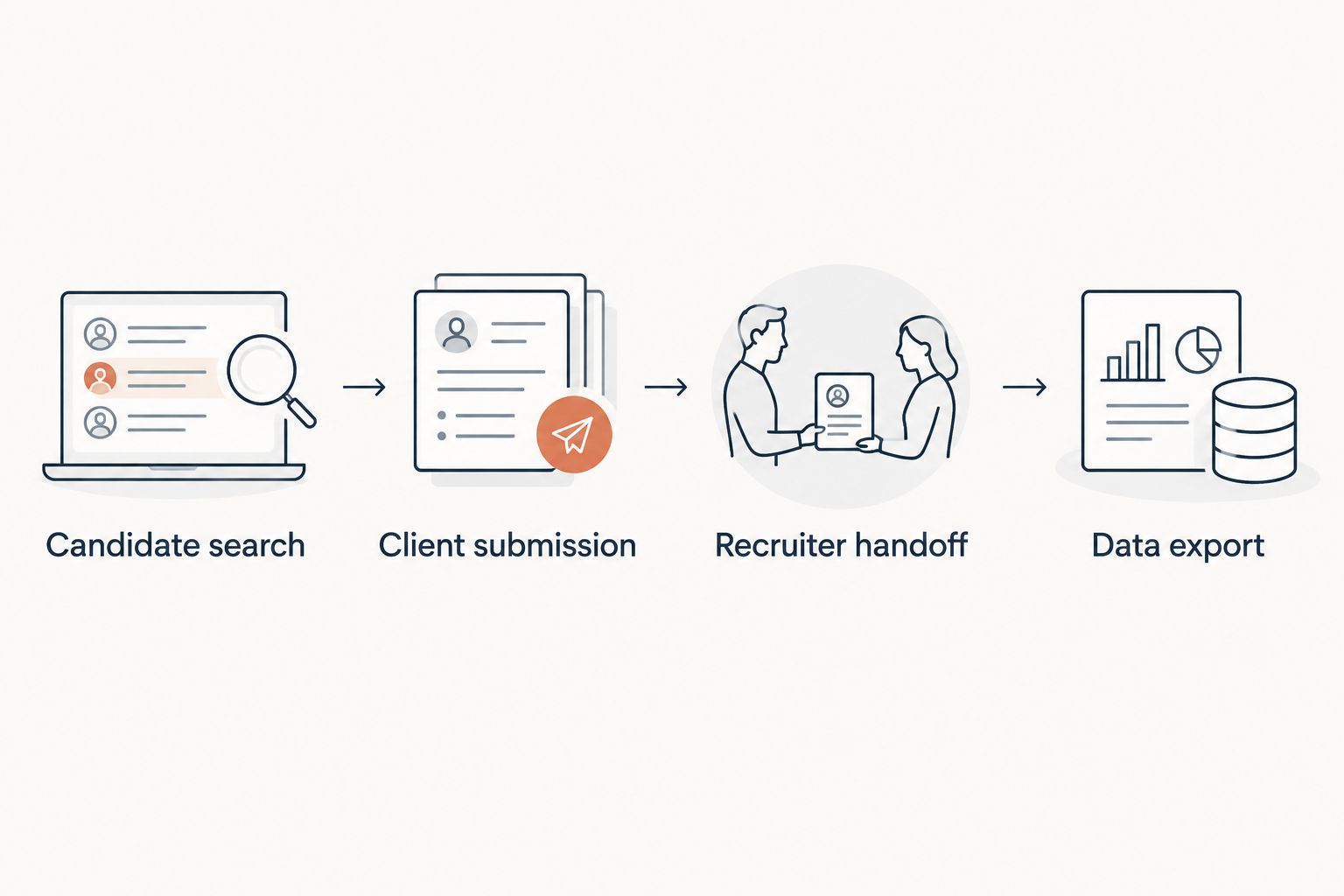
Test the complete recruiting workflow before comparing optional features.
Book a 30-minute workflow demonstration around those checks. These are suggested test conditions, not claims about vendor performance. If the vendor needs a different session format, keep the same tasks and acceptance criteria.
Write the result as pass, fail, or requires confirmation. Do not turn an unanswered question into an assumed capability.
Where staffing business development belongs
An ATS manages candidate delivery. StaffingLeads is best for staffing business development, not applicant tracking. It watches hiring, funding, past-client, and network signals, identifies decision-makers with verified email addresses, and runs email and LinkedIn sequences.
That distinction matters when your recruiters have candidate coverage but too few client conversations. StaffingLeads supports the prospecting side; it does not replace candidate records, submission tracking, or placement workflows.
Best for: Staffing agencies and recruiters that need signal-based targeting and outreach.
Strengths: Staffing-specific targeting, decision-maker identification, and outreach tied to hiring and relationship signals.
Limitations: StaffingLeads is neither an ATS nor a CRM. It has no integrations with Bullhorn, Salesforce, or HubSpot.
Keep those boundaries clear in your 2026 software plan. Choose candidate-management software for delivery and evaluate business-development software against client acquisition tasks.
How to make the final decision
Use the criteria above as acceptance tests, not a weighted score that hides a critical failure. Candidate retrieval, submission history, handoffs, and usable exports should reflect your agency's actual requirements.
Choose the setup that fixes a demonstrated workflow problem. If your current ATS passes those checks, staying is a valid decision. If it fails an essential task, require the replacement to demonstrate that task before committing.
FAQ
What's the best ATS for staffing agencies in 2026?
The best ATS for staffing agencies is the one that fits their delivery model and client ownership. Evaluate a combined ATS and CRM for full-desk work, or a candidate-focused ATS when sales and recruiting operate separately.
Do staffing agencies need both an ATS and a CRM?
Staffing agencies need candidate tracking and client relationship management, but those functions do not have to live in separate products. Choose the structure that preserves account context and makes handoffs clear.
Should a solo recruiter choose a combined ATS and CRM?
A solo recruiter should evaluate a combined ATS and CRM when they own both client development and candidate delivery. Test the complete workflow rather than assuming a combined product is automatically simpler.
When should a staffing agency keep its current ATS?
Keep the current ATS when it supports essential delivery tasks and the problems come from configuration or inconsistent usage. Replace it when a required capability remains unavailable after you confirm the options with the vendor.
Can an ATS generate new staffing clients?
Applicant tracking alone does not generate new staffing clients. Evaluate employer discovery, decision-maker identification, and outreach separately from candidate-management capabilities.
Is StaffingLeads an ATS or CRM?
StaffingLeads is neither an ATS nor a CRM. It supports staffing business development through hiring, funding, past-client, and network signals, decision-maker identification, and email and LinkedIn outreach.
Does StaffingLeads integrate with Bullhorn, Salesforce, or HubSpot?
StaffingLeads has no integrations with Bullhorn, Salesforce, or HubSpot. Do not plan a connected workflow on the assumption that those integrations exist.
One last thing
Ask a recruiter who did not attend the demo to read a sample assignment record and explain the next action. This tests the handoff, not the presenter's ability to explain the software.
If the recruiter cannot identify the candidate status, client feedback, owner, and next step, inspect the record structure before approving the system.
Related guides
Let your agent start the conversations.
StaffingLeads watches hiring, funding, past-client and network signals, finds the decision-maker behind each one, and sends personalised email and LinkedIn outreach in your voice. You pick up the replies.
Start your 14-day free trial →Keep reading
Free, no signup