LinkedIn Recruiter vs Sales Navigator for staffing business development

LinkedIn Recruiter vs Sales Navigator: Sales Navigator wins for client prospecting; Recruiter wins for candidate sourcing. Compare workflows and buying checks.

Choose LinkedIn Recruiter if you need candidates for live staffing briefs; choose Sales Navigator if you need decision-makers at prospective client companies. For staffing business development in 2026, Sales Navigator is the better fit because its account and lead workflows support client prospecting rather than candidate sourcing.
TL;DR
- LinkedIn Recruiter vs Sales Navigator: choose Sales Navigator for staffing business development and Recruiter for candidate sourcing.
- LinkedIn Recruiter supports talent searches and candidate projects; Sales Navigator supports account research and lead lists.
- Both offer InMail, but neither proves that an employer wants an external staffing supplier.
- StaffingLeads is a third option for staffing-specific signals, decision-maker identification, and email and LinkedIn sequences.
Why this matters
A full-desk recruiter works two different pipelines: employers who might buy staffing services and candidates who might fill their roles. Searching the same professional network does not make those workflows interchangeable.
The buying mistake is selecting a tool because it helps with one pipeline, then expecting it to solve the other. Sales Navigator is the better LinkedIn tool for staffing teams prospecting new client accounts. Recruiter earns its place when candidate sourcing is the bottleneck.
If you split your desk between selling and delivery, the full-desk recruitment guide provides useful context for separating those responsibilities. Make your 2026 purchase decision around the work you need to improve, not the subscription your peers use.
At a glance
| Dimension | LinkedIn Recruiter | Sales Navigator |
|---|---|---|
| Best for | Recruiters sourcing candidates for open roles | Business-development teams finding prospective client accounts |
| Standout feature | Recruiting-focused search and candidate projects | Account and lead search, lists, and alerts |
| Finding client decision-makers | Can find professionals, but organizes work around recruiting | Organizes prospecting around companies and individual leads |
| Tracking prospects | Candidate-oriented projects and recruiting workflows | Saved accounts, leads, and prospecting alerts |
| Direct LinkedIn outreach | InMail for candidate conversations | InMail for prospect conversations |
| Proving staffing demand | Requires separate qualification | Requires separate qualification |
| Full-desk fit | Stronger on the candidate-delivery side | Stronger on the client-acquisition side |
| Pricing model | Subscription with recruiting-specific plan options | Subscription with sales-specific plan options |
LinkedIn Recruiter wins for candidate sourcing
Best for: recruiters who already have job orders and need suitable candidates. LinkedIn Recruiter is built around talent search, candidate evaluation, and recruiting projects. Its recruiting-specific filters make it the stronger starting point when your question is who can fill a role.
That matters when a brief includes a particular skill set, experience profile, and location. You want to assess potential candidates and keep the search organized around the hiring requirement. Recruiter supports that work directly.
The limitation is the direction of the workflow. Finding qualified candidates does not identify which employer will buy your agency's services. A useful candidate shortlist is not a client pipeline.
Stay with Recruiter when delivery is your constraint. Switching to a sales prospecting tool because you want more revenue does not fix an inability to source candidates for existing assignments.
Sales Navigator wins for finding client decision-makers
Best for: agency owners and business-development teams building target-account lists. Sales Navigator centers its search around accounts and leads. That matches the task of finding employers that fit your ICP, then identifying relevant people inside those companies.
Use company criteria to define the market before choosing contacts. Then assess role, seniority, and responsibility against the service you sell. A department leader, an operations executive, and an HR contact can have different roles in the same staffing purchase.
Sales Navigator's strength is the account-to-person workflow. Its limitation is that a matching title does not establish purchasing authority. You still need to confirm who owns the problem, who approves suppliers, and how the company engages agencies.
For your 2026 client-acquisition plan, judge search results by relevance to your staffing niche. A long list of executives is less useful than a shorter list of accounts with a clear fit and a defensible reason to contact them.
Sales Navigator wins for account-based follow-up
Sales Navigator lets you save leads and accounts and use alerts to follow developments. That gives business-development work a company-centered structure: target the employer, identify relevant people, and revisit the account when something changes.
Recruiter uses candidate-oriented projects and recruiting workflows. Those are useful for managing a talent search, but they are not the same organizing model as an account-based sales pipeline.
Sales Navigator wins when your unit of work is the prospective client company. Recruiter wins when your unit of work is the candidate within a hiring assignment.
Neither structure removes the need for disciplined follow-up. Record why the company fits, what prompted your approach, and what the buyer said. An alert is context for a conversation, not proof that the company needs an agency.
Both offer InMail; neither supplies the sales argument
Both LinkedIn Recruiter and Sales Navigator offer InMail. That makes direct LinkedIn messaging an honest tie at the channel level, not a reason to treat the products as substitutes.
The message still has to match the recipient's problem. Candidate outreach explains the opportunity and asks about interest. Client outreach explains why your agency is relevant to the employer's hiring situation and asks for a business conversation.
Before sending, apply 3 message checks:
- Role fit: Does this person own or influence the hiring problem?
- Hiring context: Can you point to a specific, relevant reason for contacting the company?
- Next step: Does the message ask for a clear action rather than a vague introduction?
Neither product makes a generic agency pitch relevant. Keep the opening tied to the account, then explain the staffing problem you can discuss. InMail access is useful; it is not a substitute for a reason to reply.
Neither proves that an employer wants a staffing supplier
A job posting establishes that an employer is recruiting. It does not establish that the employer will use an external agency, accept a new supplier, or buy your particular service.
This is a tie because the unanswered question is commercial, not technical. Search and profile information can help identify a company and a contact. Qualification establishes whether there is a staffing opportunity.
For a 2026 prospect review, separate these questions:
- Is the company hiring within your niche?
- Is the hiring situation relevant to your operating model?
- Does the contact influence agency selection?
- Is there a route to becoming an approved supplier?
Do not label an account qualified solely because it has open jobs. Ask about the hiring constraint, existing supplier arrangements, and the decision process. Both tools become more useful when your qualification standard is clear.
Full-desk recruiters need separate buying criteria
For a full-desk recruiter, the right choice follows the bottleneck. LinkedIn Recruiter supports delivery; Sales Navigator supports client prospecting. Neither wins every part of the desk.
Map 2 workflows before choosing:
- Candidate sourcing: Start with the brief, find suitable people, assess fit, and begin candidate conversations.
- Client prospecting: Start with the ICP, identify target accounts, find relevant decision-makers, and qualify the hiring problem.
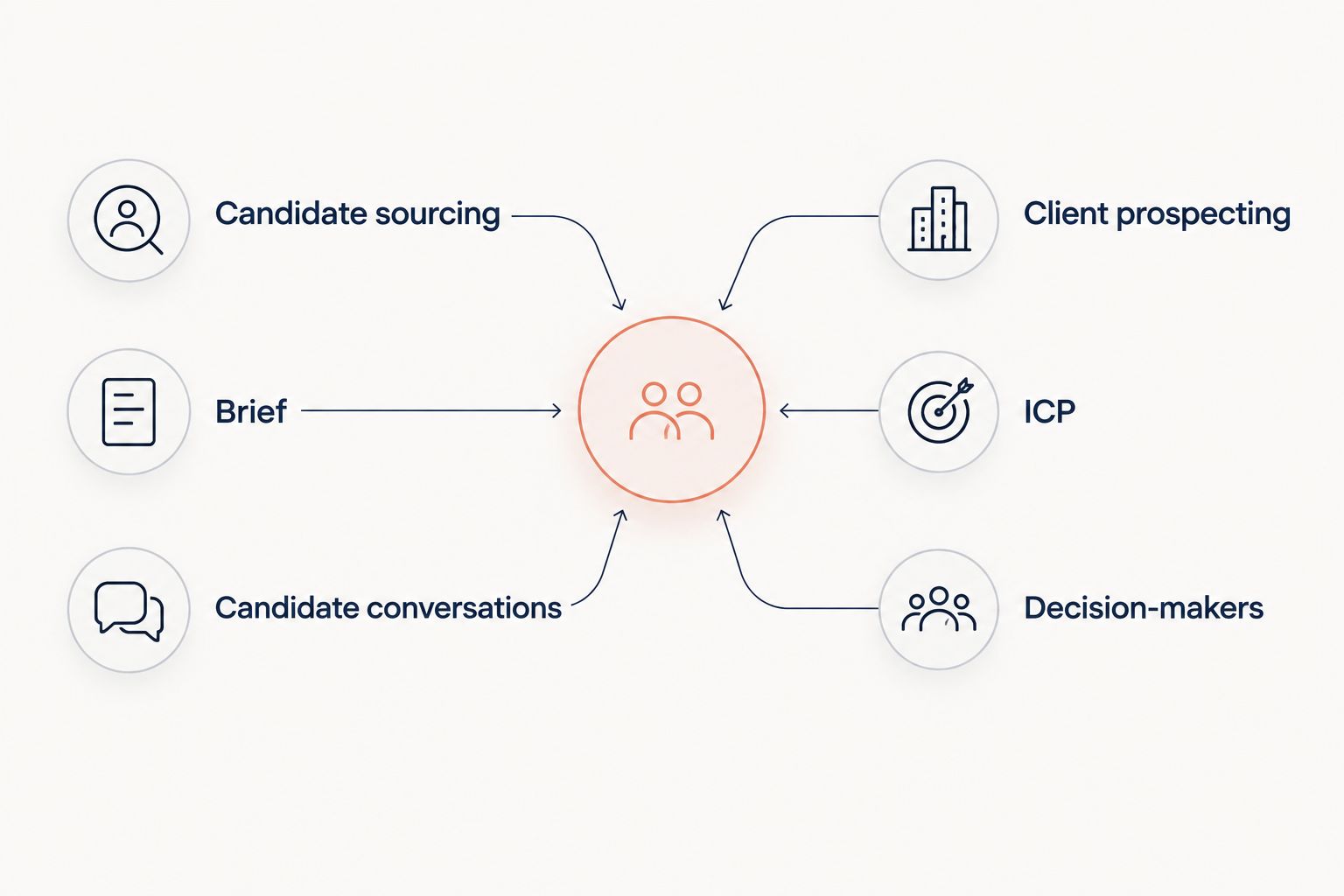
Choose the subscription around the workflow that is blocking progress.
Buying both can make sense when you actively perform both workflows. It also creates 2 subscriptions to justify, so assess each against its own outcome. Candidate sourcing should support delivery; client prospecting should support qualified employer conversations.
Do not judge both tools by the same activity count. A saved candidate and a saved sales lead represent different work. In your 2026 review, track whether each tool moves its intended pipeline forward.
Pricing: compare subscription fit, not headline cost
LinkedIn Recruiter and Sales Navigator use subscription models with different plan options. Recruiter's plans are organized around recruiting work; Sales Navigator's plans are organized around sales prospecting. Review current plan terms directly with LinkedIn before committing.
The tradeoff is committing to capabilities you will use versus paying for a broader package that does not match your desk. Compare billing commitments, included functionality, messaging allowances, and team requirements against your actual workflow.
There is no price-based winner here. A candidate-sourcing subscription is not a bargain for a team that only needs client prospecting, and a sales subscription does not replace a recruiting workflow merely because both search LinkedIn.
For a separate framework on measuring acquisition spend, use the guide to calculating CAC for a staffing agency. Keep acquisition measurement separate from the cost of delivering existing searches.
A third option addresses staffing-specific prospecting
StaffingLeads is best for staffing teams that want hiring, funding, past-client, and network signals connected to decision-maker outreach. It identifies decision-makers with verified email addresses and runs email and LinkedIn sequences.
That is a different scope from choosing a LinkedIn search subscription. The focus is staffing-specific targeting and contact timing, rather than candidate sourcing or a broad sales research workflow.
The boundary matters: StaffingLeads is not an ATS or CRM and has no integrations with Bullhorn, Salesforce, or HubSpot. Keep candidate management and your system of record separate. For the narrower question of whether a search subscription covers your prospecting needs, read whether Sales Navigator can replace a dedicated lead-generation tool.
Final verdict
Choose LinkedIn Recruiter if you own candidate delivery
Named winner: LinkedIn Recruiter. Stay with Recruiter if you have live briefs and your main task is finding, assessing, and contacting candidates. Its recruiting-focused workflow is the stronger fit for that job.
Do not replace it solely to improve client acquisition. Diagnose the sales problem separately from the sourcing problem.
Choose Sales Navigator if you own client acquisition
Named winner: Sales Navigator. Choose Sales Navigator if you are an agency owner, solo biller, or business-development specialist identifying employers and the people involved in buying staffing services.
Stay with Sales Navigator when account research and personal prospecting are your preferred approach. A dedicated staffing prospecting tool is a separate decision, not a requirement for using it effectively.
| Dimension | Winner |
|---|---|
| Candidate sourcing | LinkedIn Recruiter |
| Client decision-maker research | Sales Navigator |
| Account-based follow-up | Sales Navigator |
| Direct LinkedIn outreach | Tie: both offer InMail |
| Proof of staffing demand | Tie: both require qualification |
| Full-desk fit | Split by workflow |
| Pricing | No price-based winner |
FAQ
Is LinkedIn Recruiter or Sales Navigator better for staffing business development?
Sales Navigator is better for staffing business development because its account and lead workflows support client prospecting. LinkedIn Recruiter is the stronger fit for sourcing candidates against hiring briefs.
Can I use LinkedIn Recruiter to find staffing clients?
You can use LinkedIn Recruiter to identify professionals, but its primary workflow is recruiting. Sales Navigator better matches the task of organizing target companies and prospective client contacts.
Can Sales Navigator replace LinkedIn Recruiter?
Sales Navigator is not a like-for-like replacement for LinkedIn Recruiter. It supports sales prospecting rather than Recruiter's candidate-focused search and project workflows.
Do both tools let me send InMail?
Both LinkedIn Recruiter and Sales Navigator offer InMail. Check the current plan terms with LinkedIn, and choose based on the recipient and workflow rather than the messaging channel alone.
Does a hiring signal mean a company needs a staffing agency?
A hiring signal does not establish that a company wants an external staffing supplier. Confirm the hiring problem, supplier arrangements, and decision process before treating the account as qualified.
Should a full-desk recruiter buy both subscriptions?
A full-desk recruiter should buy both only when both candidate sourcing and client prospecting justify separate subscriptions. Evaluate each against the pipeline it is intended to improve.
Where does StaffingLeads fit alongside these LinkedIn tools?
StaffingLeads is a third option for staffing-specific signals, decision-maker identification, verified email, and email and LinkedIn sequences. It is not an ATS or CRM and has no integrations with Bullhorn, Salesforce, or HubSpot.
One last thing
Before buying, write down the task you expect the subscription to complete. If the answer is finding candidates, start with Recruiter. If the answer is finding prospective client companies and relevant buyers, start with Sales Navigator. Neither answer includes proving that an employer will buy staffing services; that remains a qualification task.
Related guides
Let your agent start the conversations.
StaffingLeads watches hiring, funding, past-client and network signals, finds the decision-maker behind each one, and sends personalised email and LinkedIn outreach in your voice. You pick up the replies.
Start your 14-day free trial →Keep reading
Free, no signup